Setup: ShareX
- ShareX is a automated tool used to
screenshot,audio recordandOCRto be pasted inAnkiCards conveniently Required for miningto anything that I use
Download and Install
- Install ShareX
- Download lazyGuide-ShareX-settings-17.0.0
- Works on newer ShareX Versions
Setting Up
-
In
ShareX>Application Settings>Settings>Import>lazyGuide-ShareX-settings- Ignore the random name files(it's empty), it's residue files that can't be removed upon export
-
In
ShareX>Hotkey Settings> Change the keybinds/name if you like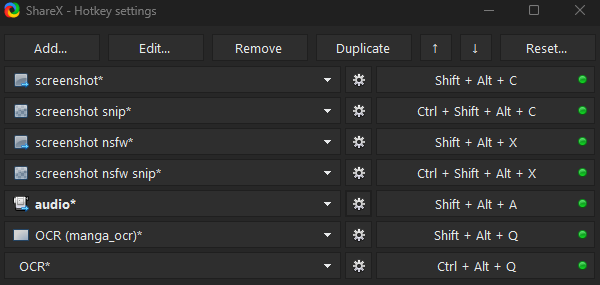
-
On your
Hotkey Settingslook for:screenshotscreenshot snipscreenshot nsfwscreenshot nsfw snipaudio- Then for each one: click the
COGicon >override screenshot folder> change thepath -
Change the
LazyGuidewith your Anki profile name:%ApplicationData%\Anki2\**YourAnkiProfileName**\collection.media- Profile name is written on the top left bar of Anki, or
File>Profileto set

- Profile name is written on the top left bar of Anki, or
- Then for each one: click the
-
For
audio:Hotkey settings>audio>screen recorder>screen recorder options- Install
recorder devices - Video source:
none - Audio source:
virtual-audio-capturer
- Install
-
Add/Mine the
wordonYomitanfirst before usingscreenshotoraudio recordhotkey usingShareX- Make sure
Ankiis running to see theAdd(+)button - Check out the Mining Demo!
- Make sure
You are done setting up ShareX, next is Visual Novel for PC
If you have any problems check FAQs
Extra Info and Tips
Info 1: Mining Demo
Mining Demo (click here)
Don't forget the Mining Demo!
Info 2: Hotkey Function
Hotkey Function (click here)
-
screenshotandscreenshot nsfw: Captures your whole main screen- If you want to edit which monitor:
Hotkey settings>screenshot>Capture>Select region...
- If you want to edit which monitor:
-
screenshot snipandscreenshot nsfw snip: Captures the region that you specify, similar to cropping -
OCR (manga_ocr)is used in Manga OCR whileOCRis your default ShareX OCR
Tip 1: Skip Audio Recording when Mining
Skip Audio Recording when Mining (click here)
-
You can skip the audio recording when mining as it is time consuming
-
If you also manage to do your Anki Cards below 5s each, you will barely hear the recorded Audio
One-handed Mining using Mouse
One-handed Mining using Mouse (click here)
Download and Install Autohotkey
Download and Run Hotkeys from here
Option 1: Alt + Screenshot Hotkey
- Forward Mouse button = ALT for monolingual pop-up
- Back Mouse button = Screenshot (non nsfw)
Option 2: Audio + Screenshot Hotkey
- Forward Mouse button = Audio recording
- Back Mouse button = Screenshot (non nsfw)
Option 3: Screenshot (NSFW) + Screenshot (non nsfw) Hotkey
- Forward Mouse button = Screenshot
- Back Mouse button = Screenshot (non nsfw)