- I recommend you to follow the current guide that's not on the Archive
I'm aware that this is an Archive (click here)
Transfer Lazy Anki Setup to JPMN
If you've been using my Anki Layout and want to transfer to JPMN
- Add-ons required: AJT Japanese and JPMN Manager (already included in my add-ons)
Installing JPMN Note
-
Extract(?)
Anki addons21.7zand paste theaddons21folder toC:\Users\**YourUser**\AppData\Roaming\Anki2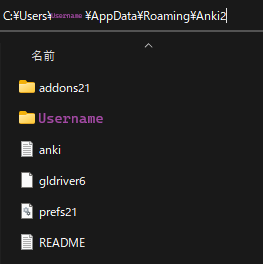
-
Restart your Anki
-
In Anki:
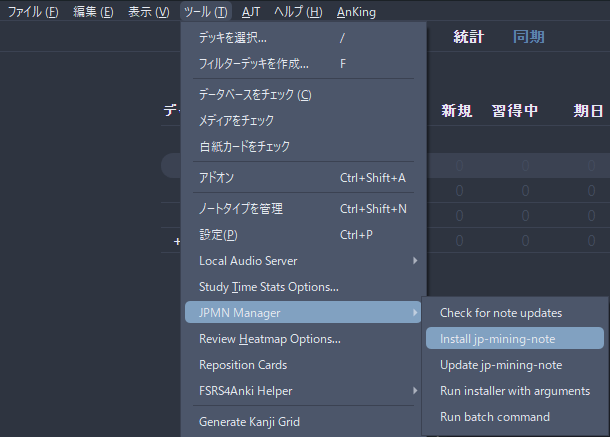
Tools>JPMN Manager>Install jp-mining-noteCtrl + Shift + AorTools>Add-ons>Check for add-ons update(important for JPMN Manager)
-
Go to:
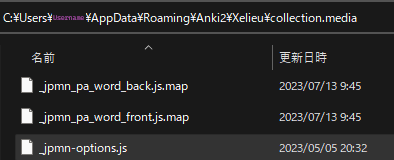
C:\Users\**YourUser**\AppData\Roaming\Anki2\**YourAnkiName**\collection.media- Search
_jpmn-options - Edit and save this config (open in notepad)
- Search
-
In Anki:
Browse> on the left side underNote Type>JP Mining Note>Card...>Styling> Scroll down to the bottom- Paste the
Styling configAFTER theINSERT CUSTOM CSS BELOWline - Editing only 1 card is enough for this to take effect to everything
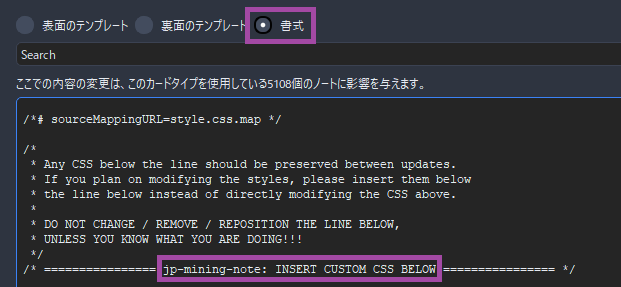
Anki Styling config (click here)
.glossary-text ol li[data-details="旺文社国語辞典 第十一版"] .dict-group__tag-list { display: none; } .glossary-text ol li[data-details="旺文社国語辞典 第十一版"] .dict-group__glossary--first-line { display: none; } .glossary-text ol li[data-details="旺文社国語辞典 第十一版"] .dict-group__glossary--first-line-break { display: none; } .glossary-text ol li[data-details="三省堂国語辞典 第七版"] .dict-group__tag-list { display: none; } .glossary-text ol li[data-details="三省堂国語辞典 第七版"] .dict-group__glossary--first-line { display: none; } .glossary-text ol li[data-details="三省堂国語辞典 第七版"] .dict-group__glossary--first-line-break { display: none; } .glossary-text ol li[data-details="実用日本語表現辞典"] .dict-group__tag-list { display: none; } .glossary-text ol li[data-details="実用日本語表現辞典"] .dict-group__glossary--first-line { display: none; } .glossary-text ol li[data-details="実用日本語表現辞典"] .dict-group__glossary--first-line-break { display: none; } .glossary-text ol li[data-details="新明解国語辞典 第八版"] .dict-group__tag-list { display: none; } .glossary-text ol li[data-details="新明解国語辞典 第八版"] .dict-group__glossary--first-line { display: none; } .glossary-text ol li[data-details="新明解国語辞典 第八版"] .dict-group__glossary--first-line-break { display: none; } .glossary-text ol li[data-details="明鏡国語辞典 第二版"] .dict-group__tag-list { display: none; } .glossary-text ol li[data-details="明鏡国語辞典 第二版"] .dict-group__glossary--first-line { display: none; } .glossary-text ol li[data-details="明鏡国語辞典 第二版"] .dict-group__glossary--first-line-break { display: none; } .glossary-text ol li[data-details="JMdict (English)"] .dict-group__tag-list { display: none; } .glossary-text ol li[data-details="JMdict (English)"] .dict-group__glossary--first-line { display: none; } .glossary-text ol li[data-details="JMdict (English)"] .dict-group__glossary--first-line-break { display: none; } .glossary-text--primary-definition ol { list-style: none; padding-left: 0em; } - Paste the
Transfer Process
-
Make a complete backup of your deck
- In
Anki, click thecogicon of yourMining Deck Exportthe deck and check everything:media,scheduling,older version compatibility
- In
-
In
Ankigo toBrowse, then selectMining DeckandSelect all the cardsorCtrl + A -
Right Click>Notes>Change Note Type...>JP Mining note -
Follow this image:
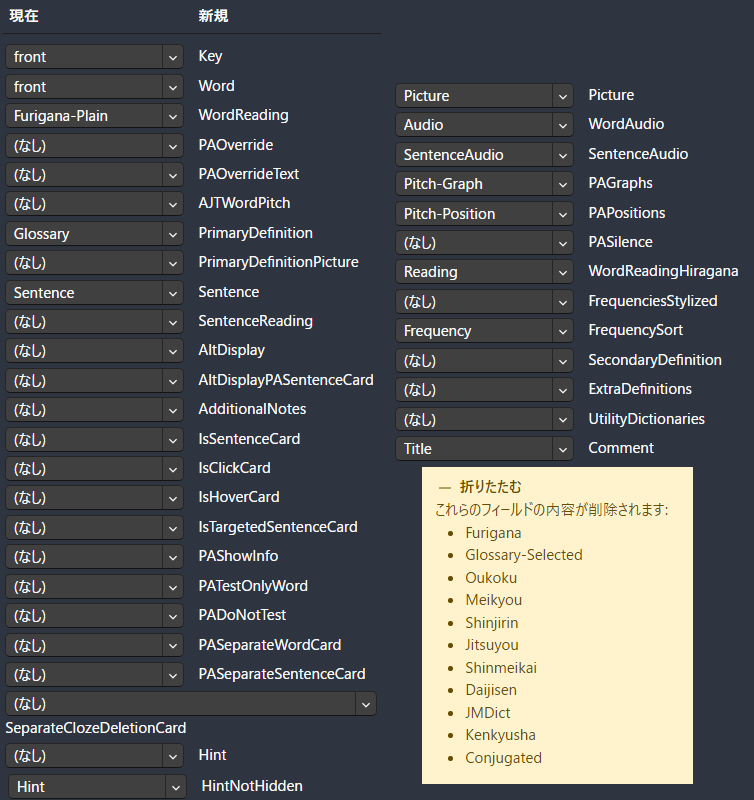
-
On
Anki:Browse> Under Decks, clickJP Mining Note>select everythingorCtrl + A- On
Toolbar:Notes>Find and Replace- Find:
<strong>(?P<t>.*?)</strong> - Replace With:
<b>$t</b> - In:
Sentence - Selected notes only:
Checked - Ignore case:
Unchecked - Treat input as a regular expression:
Checked
- Find:
- Apply it
- On
-
Again,
select allthecardsthen on top lefttoolbar:Edit>AJT Bulk Generatethen wait -
Tools>JPMN Manager>Run Batch Command> inputset_pasilence_field -
After that you can now follow Updating: Anki JPMN Note to get the latest bug fixes
-
Switch to my Yomitan Setup
Better Monoandupdated dictsthat isn't currently compatible on myLazyFormat- Follow Yomitan On PC for easy import of
DictionariesandSettings
Monolingual Cards Transfer
This is needed for people that used my Monolingual format or you won't have definitions on JPMN
-
Download and Install Python (
3.10.xx ONLY) and GitCheck 'Add Python to PATH' (click here)
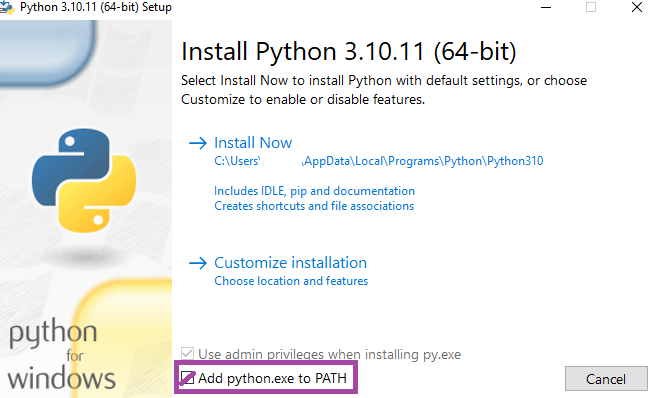
-
Make a new profile on
Ankiandimportthe old Mining Deck (The backup) -
Open
command prompt(cmd) -
Run the following commands (don't type
yeswhen prompted):git clone https://github.com/Aquafina-water-bottle/jp-mining-note.gitcd jp-mining-note/toolspython batch.py -f combine_backup_xelieu- Go back to your
main profileinAnki - In command line, type
yes
-
Done
Extra Info and Tips
Tip 1: Anki Keyboard Shortcuts
Anki Keyboard Shortcuts (click here)
When viewing a card, you can use shortcuts to expand for more info:
Q:Secondary DefinitionW:Extra Definition[:Extra Info
Tip 2: Anki Pitch Accent Color
Anki Pitch Accent Color (click here)
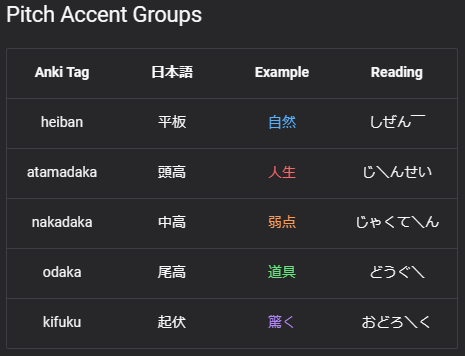
When viewing a card, they are color assigned with the following: